Appearance
In-Game Currency Offers
This document explains how to define Offers that are paid with in-game currency rather than in-app purchases.
This document explains how to define Offers that are paid with in-game currency rather than in-app purchases.
Offers are often defined to be paid with in-app purchases. Alternatively, it is possible to define them with an arbitrary in-game currency cost. You can have some of your Offers paid with IAPs and some with in-game currency.
This section shows the minimal steps to implement in-game currency cost for your Offers.
Decide what in-game resources the Offer should be paid with. The cost can consist of any number of fields. In this example we have just a gem cost.
Add this cost to your Offer's config data class, defined in Extending the Config Data.
public class GameOfferInfo : MetaOfferInfoBase
{
    ...
    [MetaMember(2)] public int GemCost;

    public GameOfferInfo(GameOfferSourceConfigItem source)
        : base(source)
    {
        ...
        GemCost = source.GemCost;
    }
}

public class GameOfferSourceConfigItem : MetaOfferSourceConfigItemBase<GameOfferInfo>
{
    ...
    public int GemCost;
}
Override the MetaOfferInfoBase.HasInGameCurrencyCost property to allow the SDK to distinguish in-game currency Offers from IAP Offers. The SDK will not allow buying an IAP Offer using in-game currencies or vice-versa.
public class GameOfferInfo : MetaOfferInfoBase
{
    ...
    [MetaMember(2)] public int GemCost;

    public override bool HasInGameCurrencyCost => GemCost > 0;
}
In your Offers config sheet, any Offer can have either the InAppProduct or the in-game currency cost, but not both.
| OfferId #key | DisplayName | Description | InAppProduct | GemCost | Rewards[0] | ... |
|---|---|---|---|---|---|---|
| GoldOffer | Gold Offer | Gold offer (in-game currency cost) | 10 | ... | ... | |
| WeaponOffer | Weapon Offer | Weapon offer (IAP cost) | Offer5Usd | ... | ... |
When the player buys an Offer with an in-game currency cost, the system needs to check that the player has enough resources and then remove them from the player. You must implement these by overriding CanAffordInGameCurrencyCost(...) and PayInGameCurrencyCost(...) in your MetaOfferInfoBase subclass.
public class GameOfferInfo : MetaOfferInfoBase
{
    ...

    public override bool CanAffordInGameCurrencyCost(IPlayerModelBase playerBase, MetaOfferGroupInfoBase offerGroupInfo)
    {
        PlayerModel player = (PlayerModel)playerBase;
        return player.Wallet.NumGems >= GemCost;
    }

    public override void PayInGameCurrencyCost(IPlayerModelBase playerBase, MetaOfferGroupInfoBase offerGroupInfo)
    {
        PlayerModel player = (PlayerModel)playerBase;
        player.Wallet.NumGems -= GemCost;
    }
}In Step 7: Implement Purchase Triggering of the main Offer guide, the shop button handles IAP Offers. Now, you should check if the Offer has an in-game currency cost, and if so, invoke the PlayerPurchaseInGameCurrencyMetaOffer action instead.
public void OnClickBuy()
{
    PlayerModel             player          = MetaplayClient.PlayerModel;
    MetaOfferGroupInfoBase  offerGroupInfo  = player.GameConfig.OfferGroups[OfferGroupId];
    MetaOfferInfoBase       offerInfo       = player.GameConfig.Offers[OfferId];
    PurchaseAnalyticsContext analyticsContext = new GamePurchaseAnalyticsContext(...); // can be null if not needed

    if (offerInfo.HasInGameCurrencyCost)
    {
        MetaplayClient.PlayerContext.ExecuteAction(new PlayerPurchaseInGameCurrencyMetaOffer(offerGroupInfo, offerInfo, analyticsContext));
    }
    else
    {
        ... pre-existing IAP code ...
        MetaplayClient.PlayerContext.ExecuteAction(new PlayerPreparePurchaseMetaOffer(offerGroupInfo, offerInfo, analyticsContext));
        ...
    }
}
Unlike the IAP path, which is a multi-step operation that the button click merely initiates, the in-game currency path involves just this single action that completes immediately. The action takes the cost and grants the rewards in one go.
In your shop UI, you should show the in-game currency cost instead of an IAP's price.
void Start()
{
    ...

    GameOfferInfo offerInfo = player.GameConfig.Offers[OfferId];

    if (offerInfo.HasInGameCurrencyCost)
    {
        PriceText.text = $"{offerInfo.GemCost} gems";
    }
    else
    {
        ... pre-existing IAP code ...
        IAPManager.StoreProductInfo? storeProduct = MetaplayClient.IAPManager.TryGetStoreProductInfo(offerInfo.InAppProduct.Ref.ProductId);
        if (storeProduct.HasValue)
            PriceText.text = storeProduct.Value.LocalizedPriceString;
    }

}In your shop UI, you can add a visual indicator for when the player cannot afford the cost.
...
public GameObject CannotAffordIndicator;

void Update()
{
    ...

    if (offerInfo.HasInGameCurrencyCost)
    {
        CannotAffordIndicator.SetActive(!offerInfo.CanAffordInGameCurrencyCost(player, offerGroupInfo));
    }

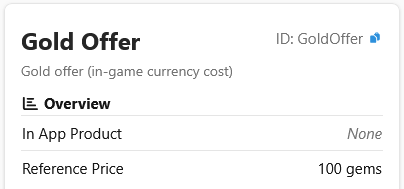
}By default, the LiveOps dashboard can only visualize the IAP costs of Offers. By implementing the MetaOfferInfoBase.GetInGameCurrencyCostForDashboard() method, you can add in-game currency cost information to the places in the dashboard where the Offer is shown. This method is only called for Offers for which HasInGameCurrencyCost is true.
public class GameOfferInfo : MetaOfferInfoBase
{
    ...

    public override string GetInGameCurrencyCostForDashboard() => $"{GemCost} gems";
}