
Appearance
Game Config Archives
A game config archive is a file containing a collection of Game Config Libraries as binary serialized files. Archive files are used to group together a set of related configs as a single atomic unit.
A game config archive is a file containing a collection of Game Config Libraries as binary serialized files. Archive files are used to group together a set of related configs as a single atomic unit.
Game configs are built to be distributed as game config archives. Archives not only store the actual game config data but also important metadata that makes managing the various versions of game configs a lot easier.
Archives are usually stored on disk as a single .mpa file, which may contain multiple entries. Entries are binary blobs with optional compression, and may contain any data. Most commonly however, each entry contains an individual Game Config Library within it.
Each Library is encoded in a binary format for efficient parsing on both the server and the client. This has the benefit of eliminating ambiguity in terms of the format; the device's culture settings do not affect the parsing of dates, times, and numbers. Parsing binary formats is also much faster and does fewer memory allocations than textual formats like CSV or JSON. That being said, including raw files in other formats (like CSV or JSON) is also supported.
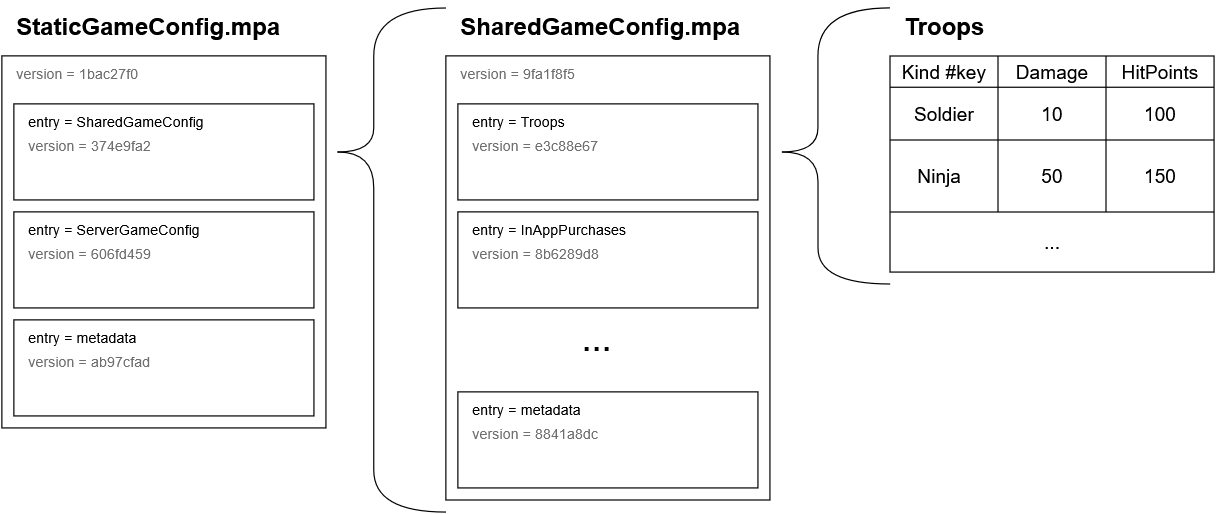
The Metaplay SDK builds a single file .mpa archive out of the game config data declared in the SharedGameConfig and ServerGameConfig classes. This archive is typically called StaticGameConfig.mpa. Internally, this archive consists of sub-archives for shared and server-only data. For purposes of distributing to the client or including in the client build, the SharedGameConfig.mpa sub-archive can be extracted from StaticGameConfig.mpa.
💡 Mixing Server-Only and Shared Config Data
Ideally, any data that is only used by the server should be stored in the ServerGameConfig to avoid delivering them to the client. It can be convenient however to store the data in the Shared config, and for that purpose, any field in a config can be marked as [ServerOnly]. When server delivers the Shared Game Config to the client, these [ServerOnly] fields are stripped.
For example:
[MetaSerializable]
public class TroopInfo : IGameConfigData<TroopKind>
{
    ...
    [MetaMember(10), ServerOnly] public string IconInDashboard { get; private set; }
}| Kind #key | ... | IconInDashboard |
|---|---|---|
| Soldier | assets/icon-soldier.png | |
| Ninja | assets/cool-ninja.png |
While this allows an easy way to mix shared and server-only config data, note that the fields are still accessible on the client. The filtering only clears their values. Using these fields in an Action or Tick will lead to a desync and a checksum mismatch.
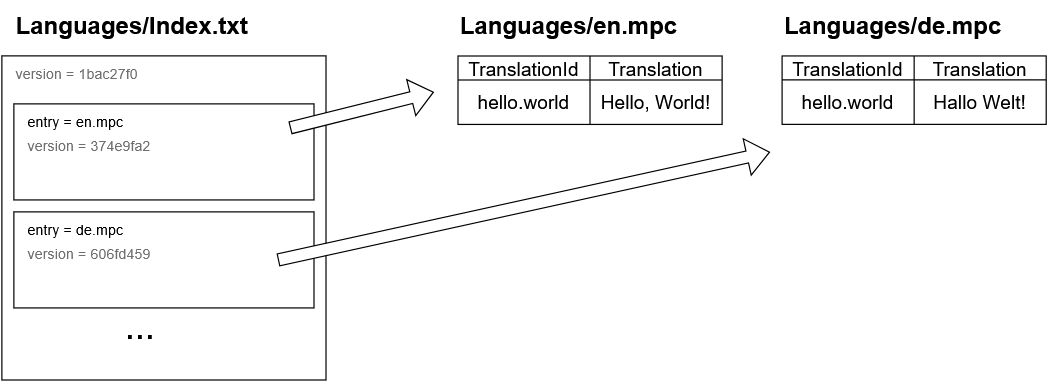
Alternatively, an archive can also be written to disk as multiple files in a directory, one for each contained Library, along with an added Index.txt for the archive's metadata. This mode of operation is mostly used in Localization, where storing each language separately allows client to only download, store and load a single language library.
The archives are versioned using Git-like hashing. This reduces the chance of accidentally mixing data from multiple archive versions. Versioning also enables caching of the data on the client, so the client only needs to download each version of the data once from the CDN.
📦 Opaque Binary Archives
The binary format of archives used by Metaplay is rather opaque. If this inconveniences your development workflow and you'd like to be able to view the contents without starting the dashboard, please talk to us for ways to expose the raw data.